What makes it different
- Built around default launcher behavior instead of a standalone utility flow.
- Combines map, speed, analyzer, and password tools under one home experience.
- Keeps support, privacy, and legal access visible from one public site.
 WiFi Launcher: Map Tool
Launcher utility for Android
WiFi Launcher: Map Tool blends a cleaner launcher home with practical Wi-Fi tools, making network discovery, signal review, speed testing, and quick launcher actions feel like one connected Android experience.
What makes it different
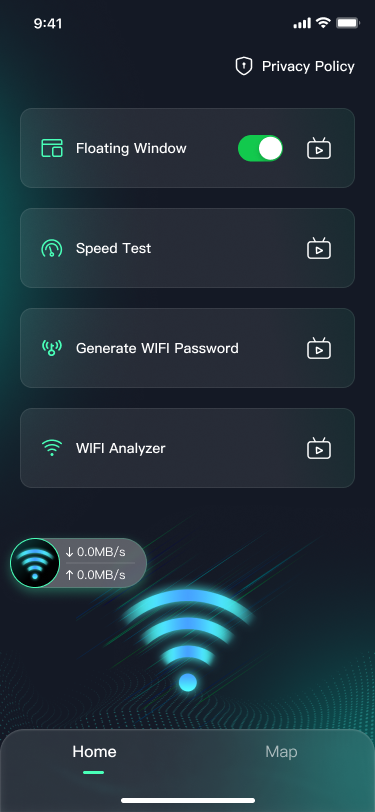
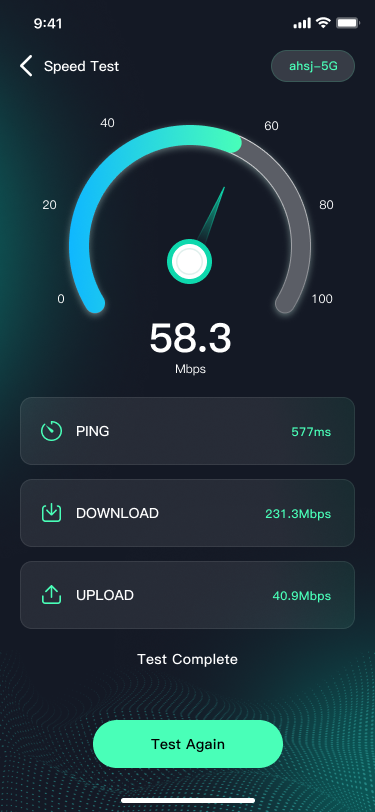
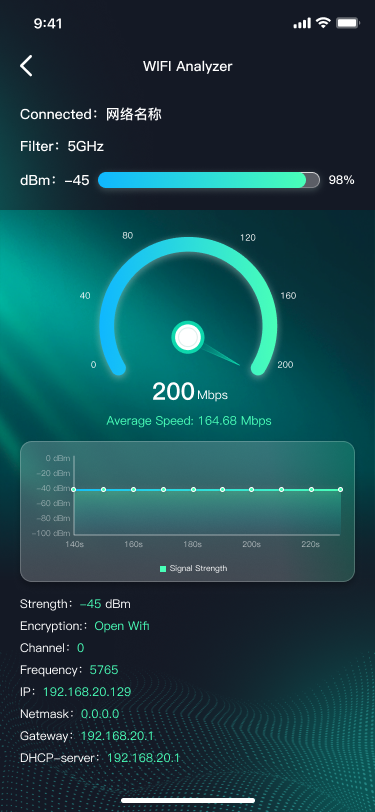
At a glance
The site is intentionally structured around product capability clusters instead of a generic app marketing grid, so it reads more like a focused launcher + network tool and less like a recycled utility landing page.
Set the app as launcher and keep desktop controls, widgets, wallpapers, and app drawer access in one place.
Browse Wi-Fi availability through a more visual map-style entry instead of a plain system list view.
Check signal strength, dBm, channel, frequency, IP details, and related network values in a clearer format.
Generate passwords, launch speed tests, and keep network status accessible through lightweight floating tools.
Core features
Use the app as your Android launcher and access app drawer behavior, wallpapers, widgets, and desktop-level shortcuts from the same surface.
Move from nearby network browsing into deeper signal and channel information without switching product context.
Measure ping, download, and upload performance with a result flow that is easier to read at a glance.
Create Wi-Fi passwords with adjustable length and character rules directly inside the app.
After overlay permission is granted, keep lightweight network tools visible above launcher or app screens.
FAQ
The launcher home, app drawer, widgets, and wallpaper tools depend on Android launcher behavior. If you do not set the app as the default launcher, some launcher functions may be limited.
Android may require location permission for Wi-Fi scanning, nearby network discovery, and map-related Wi-Fi features. If permission is denied, related functions may not work as expected.
This permission is used for the floating window feature. If you do not enable it, the floating network status window cannot appear above other apps.
Yes. Some screens and feature flows may include advertising placements. Please review the Privacy Policy for more information about third-party services and advertising providers.